
Directory of Billing Solutions for Small Medical Practices
Small practices lose money in quiet places: missed eligibility checks, weak charge capture, claim rejections, payer denials, underpayments, slow patient collections, and balances nobody owns. A useful billing solution should reduce those leaks without burying a small team inside complicated software, expensive add-ons, or vague “automation” that still needs constant manual cleanup. This directory breaks billing solutions by function, so practices can choose tools and workflows that protect cash flow, compliance, staff time, and patient trust.

1. Why Small Medical Practices Need a Billing Solution Directory
A small practice needs billing solutions that match its actual bottlenecks, because a solo clinic, specialty group, urgent care office, therapy practice, and multi-provider primary care office usually have different revenue problems. One practice may need better electronic claims submission platforms, another may need stronger denial management services, while another may need basic practice management system terms, cleaner charge capture terms, and a more disciplined medical billing reconciliation process before it spends money on new software.
The danger is buying a tool before diagnosing the leak. Many small practices purchase billing software because claims are slow, then later discover the real issue is poor front-desk insurance verification, missing authorization, weak provider documentation, incorrect modifiers, delayed charge entry, or ignored clearinghouse rejections. A good billing solution directory helps owners and managers separate software problems from workflow problems. It also helps teams connect accurate medical billing and reimbursement, healthcare claims management terms, clearinghouse terminology, coding edits and modifiers, and claim adjustment reason codes into one revenue protection plan.
For small practices, the best billing solution is usually the one that makes the next right action obvious. Staff should know whether a claim is waiting on documentation, stuck in rejection, pending payer review, denied for medical necessity, underpaid, transferred to patient responsibility, or ready for appeal. Without that visibility, the practice runs on guesswork. Claims sit. Patients get confusing bills. Providers blame coders. Billers chase payers without clean evidence. Managers only notice the damage when cash drops. A solution directory prevents that by organizing tools around real work: eligibility, coding support, claim submission, denial recovery, payment posting, patient billing, analytics, compliance, and staff accountability. This connects directly with EOB interpretation, RARC guidance, revenue cycle metrics, revenue leakage prevention, and RCM terms.
Small Practice Billing Solution Directory: What Each Tool Should Fix
| Billing Solution Category | What It Handles | Pain Point It Solves | Best Fit for Small Practices |
|---|---|---|---|
| Eligibility verification | Insurance status, benefits, coverage dates, copays | Front-end denials from inactive or incorrect coverage | Practices with frequent new patients or payer changes |
| Prior authorization tracking | Authorization requests, approvals, expiration dates | Denied services because authorization was missing or expired | Specialists, imaging-heavy clinics, therapy practices |
| Practice management system | Scheduling, billing, accounts, claims, patient balances | Scattered workflow across spreadsheets and disconnected systems | Any practice needing one operational billing hub |
| EHR billing integration | Clinical documentation to billing workflow connection | Charges delayed because notes and billing do not connect | Practices with provider documentation bottlenecks |
| Charge capture tool | Services performed, missed charges, billable items | Revenue leakage from services never billed | High-volume clinics and procedure-based practices |
| Coding validation tool | Code checks, diagnosis support, modifier logic | Claims denied because coding and documentation do not align | Practices with recurring coding-related denials |
| Modifier edit support | Procedure edits, bundling rules, modifier warnings | Underpayment or denial from missing modifier review | Multi-service and specialty practices |
| Medical necessity checker | Diagnosis-to-service support review | Denials when services lack diagnosis support | Medicare-heavy and diagnostic service practices |
| Clearinghouse solution | Electronic claim routing and rejection checks | Claims failing before payer adjudication | Practices submitting claims to multiple payers |
| Claim scrubber | Pre-submission claim error detection | Preventable rejections and payer edits | Teams with high claim correction workload |
| EDI transaction tool | Electronic claims, remittance, eligibility, status files | Manual payer follow-up and transaction confusion | Practices scaling beyond basic portal billing |
| Claim status tracking | Payer status, pending claims, follow-up queues | Claims aging silently without staff ownership | Practices with growing AR days |
| Denial management platform | Denial categorization, appeals, root-cause tracking | Repeated denials fixed one by one without prevention | Practices losing time to recurring payer issues |
| Appeals workflow tool | Appeal letters, evidence packets, deadline tracking | Missed appeal windows and weak payer responses | Specialists billing higher-dollar services |
| Payment posting tool | ERA posting, adjustments, transfers, reversals | Incorrect balances and messy patient statements | Practices with high payer payment volume |
| Reconciliation solution | Billed, allowed, paid, adjusted, outstanding matching | Underpayments and missing payments going unnoticed | Practices with payer contract complexity |
| Patient payment portal | Online payments, saved cards, statements, reminders | Slow patient collections and staff phone burden | Practices with rising patient responsibility |
| Patient statement system | Paper and digital statements, balance notices | Confusing bills and delayed patient response | Practices needing clearer billing communication |
| Collections workflow | Aging balances, payment plans, escalation rules | Unmanaged patient AR and bad debt growth | Practices with high deductibles and self-pay balances |
| RCM reporting dashboard | KPIs, denial rates, AR days, clean claim rate | Managers discovering problems too late | Owners needing weekly revenue visibility |
| Audit support tool | Documentation review, coding checks, compliance evidence | Billing decisions that cannot be defended later | Practices with compliance exposure or payer audits |
| Credentialing and payer enrollment | Provider enrollment, payer contracts, participation status | Claims denied or delayed because provider setup is incomplete | New practices and expanding provider groups |
| Outsourced billing service | Claim submission, follow-up, payment posting, AR work | Internal team lacks time or expertise | Practices needing operational relief with oversight |
| Specialty billing support | Rules for cardiology, radiology, dermatology, GI, orthopedics | General billing workflows missing specialty-specific risks | Procedure-heavy or specialty-specific practices |
| Telemedicine billing tool | Virtual visit codes, place of service, payer rules | Incorrect telehealth billing after policy changes | Hybrid practices offering virtual care |
| Compliance training platform | HIPAA, documentation, billing rules, staff education | Repeated errors caused by staff knowledge gaps | Small teams with cross-trained front and back office staff |
| Data security solution | Access control, secure billing data, privacy safeguards | Billing data exposure and privacy risk | Any practice handling patient financial information |
| Training and certification support | Billing education, coding basics, exam readiness | Staff know tasks but lack billing judgment | Practices building an internal billing team |
2. Front-End Billing Solutions: Stop Denials Before the Visit Becomes a Claim
Front-end billing solutions protect small practices before clinical work turns into claim work. The most important front-end tools verify eligibility, estimate patient responsibility, confirm payer requirements, capture demographics accurately, flag prior authorization needs, and make sure the right payer order is used. This matters because many expensive billing problems are created before the provider sees the patient. If the front desk enters the wrong insurance ID, misses coordination of benefits, skips authorization, or fails to collect the right copay, the back office inherits a preventable problem. Strong front-end workflows should use coordination of benefits guidance, patient responsibility terms, commercial insurance billing terms, Medicaid billing software concepts, and Medicare reimbursement guidance.
Eligibility and benefit verification tools are often the first solution a small practice should tighten because they reduce avoidable denials without requiring a full system overhaul. A good verification process should confirm active coverage, effective dates, payer type, plan limitations, referral requirements, copay, deductible, coinsurance, and secondary payer rules. Small practices feel the pain hardest when staff only verify insurance once a year, because patients change plans, deductibles reset, Medicare coverage shifts, Medicaid eligibility changes, and employer-sponsored coverage may terminate without warning. The front-end team should connect eligibility results with CMS-1500 form terms, UB-04 billing form guidance, EDI billing terms, healthcare billing acronyms, and medical billing workflow terms.
Prior authorization tracking is another high-value solution for small practices because one missed authorization can wipe out payment on a service that required expensive staff time, provider time, supplies, or equipment. The system should show what was requested, what was approved, which dates are covered, which service codes are included, which payer rules apply, and when approval expires. Staff should also know when authorization is separate from medical necessity, because approval does not always guarantee payment if documentation fails later. Small practices should connect authorization workflows to medical necessity criteria, utilization review terms, clinical decision support terms, value-based care coding, and MACRA terms.
3. Coding, Claim Submission, and Clearinghouse Solutions for Small Teams
Coding support solutions help small practices catch errors before claims leave the office. The best tools and workflows check diagnosis-to-procedure support, modifier needs, payer edits, bundling issues, place of service, documentation gaps, and code specificity. Small teams often rely on one biller or office manager to catch everything, which creates risk when the practice grows or the payer mix becomes more complex. A useful coding solution should support judgment, not replace it blindly. It should help staff ask better questions, especially when documentation does not support the billed service. This is where coding edits and modifiers, CPT modifiers, clinical documentation improvement terms, coding query process terms, and coding ethics standards become daily safeguards.
Claim scrubbers and clearinghouse tools should reduce preventable rejections before payers ever adjudicate the claim. A rejection usually means the claim failed a format, data, or submission requirement, while a denial usually means the payer reviewed and refused payment based on coverage, coding, medical necessity, authorization, coordination, or policy. Small practices lose time when staff treat all unpaid claims the same. The right billing solution should separate rejected claims, denied claims, pending claims, underpaid claims, and patient-responsibility balances into clear queues. That distinction helps staff work faster and prevents one messy AR bucket from hiding everything. Teams should align these tools with clearinghouse terminology, electronic claims submission platforms, healthcare claims management, claim adjustment reason codes, and RARC dictionary guidance.
Specialty billing solutions matter when the practice performs services with higher coding complexity. Cardiology, dermatology, gastroenterology, orthopedics, radiology, emergency medicine, allergy and immunology, dialysis, infusion therapy, and ambulance billing all carry different documentation and payer risks. A general billing platform may submit claims, but specialty rules decide whether the claim survives scrutiny. Small practices should avoid assuming that one generic workflow fits every service line. Specialty-specific review should connect cardiology CPT coding, dermatology CPT essentials, gastroenterology CPT codes, orthopedic surgery CPT coding, and radiology CPT coding.
Quick Poll: Where is your small practice losing the most billing time?
4. Denial Management, Payment Posting, and Reconciliation Solutions
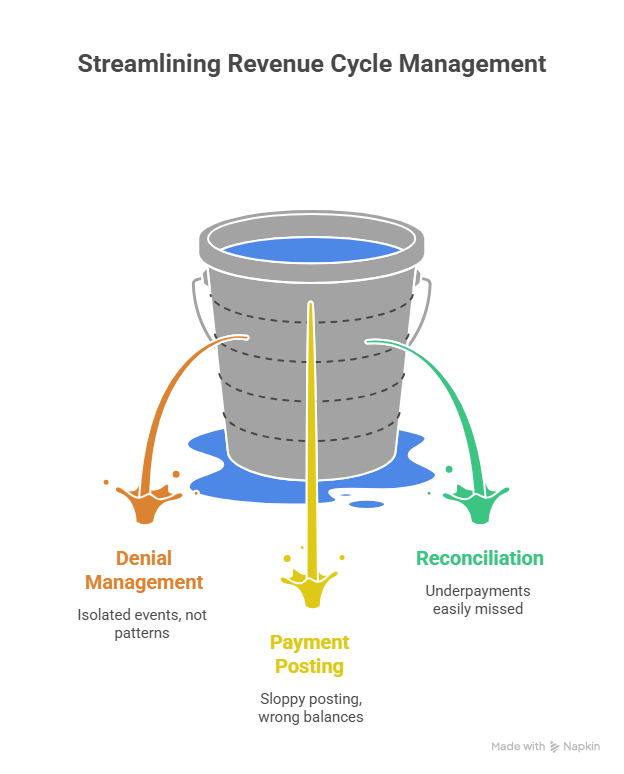
Denial management solutions should do more than store denied claims. They should help the practice identify denial category, payer, provider, service line, root cause, dollar impact, appeal deadline, correction owner, and prevention action. Small practices often lose money because denials are treated as isolated events instead of patterns. If the same payer denies the same service every week, the practice has a process issue. If one provider’s documentation repeatedly fails medical necessity, the practice has a documentation issue. If the same modifier is missing, the practice has a coding review issue. Strong denial workflows should connect coding denials management, denial management services, medical coding error prevention, medical coding audit terms, and billing compliance violations.
Payment posting tools protect cash accuracy after payers respond. Posting should capture paid amounts, allowed amounts, contractual adjustments, patient responsibility, denials, reversals, recoupments, and secondary billing needs. When posting is sloppy, patients receive wrong balances, staff chase claims that were already resolved, and managers cannot trust AR reports. Small practices should prioritize posting solutions that make payer responses readable and traceable. This is especially important when ERA data, EOBs, CARCs, RARCs, deductibles, coinsurance, and secondary claims all collide in one account. Payment accuracy depends on payment posting terms, Explanation of Benefits interpretation, claim adjustment reason code guidance, remittance advice remark codes, and coordination of benefits.
Reconciliation solutions are essential for small practices because underpayments are easy to miss when staff only ask whether “something was paid.” The stronger question is whether the payer paid correctly according to contract, allowed amount, coverage rules, secondary responsibility, and patient balance transfer. A reconciliation workflow should match what was billed, what was allowed, what was paid, what was adjusted, what remains, who owns it, and what action is next. Practices that skip reconciliation often mistake activity for revenue control. Strong reconciliation should be paired with claims reconciliation terms, cost reporting in medical billing, physician fee schedule reimbursement, hospital reimbursement analysis, and revenue cycle management efficiency.
5. How to Choose the Right Billing Solution Without Overbuying
Start with the practice’s revenue leak, then choose the solution that directly attacks it. If claims are rejected, examine demographics, payer IDs, claim forms, clearinghouse edits, and EDI workflow. If claims are denied, examine medical necessity, authorization, coding, modifiers, payer policy, and documentation. If payments are low, examine contract terms, allowed amounts, posting, reconciliation, and secondary billing. If patient collections are weak, examine statements, estimates, portal payments, payment plans, and balance communication. This problem-first approach prevents overbuying. Small practices should map each leak through revenue leakage prevention, impact of coding accuracy on revenue, billing reconciliation terms, RCM metrics and KPIs, and coding productivity benchmarks.
Next, test whether the solution fits the team’s capacity. A small practice may buy a powerful platform and still fail if nobody has time to configure rules, monitor queues, update payer settings, work reports, train staff, or review exceptions. The best solution for a small practice is often the one the team will actually use every day. That means simple dashboards, clear task ownership, payer-specific alerts, easy reporting, readable remittance data, and workflows that match existing staffing. Small teams should combine software decisions with professional development terms, coding competency assessment, medical coding education terms, CBCS exam terms, and medical coding certification terms.
Finally, evaluate compliance and security before signing. Billing solutions handle protected health information, payer data, patient balances, provider details, claim histories, remittance files, and payment information. A cheap system that creates privacy, access, audit, or documentation risk can become expensive quickly. Small practices should ask about user permissions, audit trails, data exports, secure communication, support response time, reporting access, and documentation retention. They should also clarify whether outsourced vendors follow practice policies and provide visibility into work performed. Safe selection depends on healthcare data security terms, HIPAA compliance changes, medical record retention, Stark Law and Anti-Kickback terms, and coding compliance guidance.
6. FAQs About Billing Solutions for Small Medical Practices
-
The first solution should match the practice’s biggest leak. If claims are rejected, start with clearinghouse edits and claim scrubber workflow. If denials are rising, start with denial management and documentation review. If patient balances are growing, start with estimates, statements, and payment tools. A small practice should avoid buying a broad platform before reviewing medical billing workflow terms, claims management terms, revenue cycle metrics, and revenue leakage prevention.
-
Outsourced billing can help when the internal team lacks time, coding support, payer follow-up capacity, or denial expertise. In-house billing can work well when staff are trained, reports are monitored, and workflows are consistent. The best decision depends on control, cost, transparency, specialty complexity, and staff capability. A practice should compare both options using practice management system terms, denial management services, payment posting guidance, and billing compliance standards.
-
The most important features are eligibility verification, clean claim checks, claim submission, rejection handling, denial tracking, ERA posting, patient statements, reporting dashboards, user permissions, and audit trails. Specialty practices may also need authorization tracking, modifier edits, medical necessity checks, and procedure-specific workflows. Feature selection should be based on the practice’s payer mix and service type. Strong evaluation should include electronic claims submission, clearinghouse terminology, EDI billing terms, and medical billing reconciliation.
-
Small practices reduce denials by fixing root causes before claims are submitted. That means verifying coverage, capturing authorization, improving documentation, checking medical necessity, using correct modifiers, reviewing payer edits, and tracking denial patterns by payer and provider. Denials become manageable when staff know whether the problem started at registration, documentation, coding, submission, or payer adjudication. Practices should use coding denials management, claim adjustment reason codes, RARC explanations, and medical necessity criteria.
-
Billing solutions improve patient collections when they make responsibility clear early, explain balances accurately, send statements quickly, support online payments, offer payment plans, and prevent patients from receiving confusing or incorrect bills. Patient collection problems often begin when eligibility, COB, deductible, coinsurance, and posting details are handled poorly. Small practices should align patient billing tools with patient responsibility terms, EOB interpretation, coordination of benefits, and collections and bad debt terms.
-
The biggest mistake is choosing a system before diagnosing the workflow failure. Software cannot fully fix poor documentation, inconsistent eligibility checks, weak authorization tracking, untrained staff, ignored denials, or messy payment posting. A practice should first identify where money is leaking, then choose a solution that makes that specific process measurable and easier to control. Smarter selection starts with revenue cycle management terms, charge capture terms, claims reconciliation, and coding error prevention.
