
Directory of Billing Solutions for Small Medical Practices
Small medical practices lose revenue in places that rarely look dramatic at first glance: weak charge capture workflows, delayed payment posting, unclear claims management processes, and misread EOB details. Small teams feel each miss immediately because one broken step can interrupt the whole revenue cycle.
This directory shows which billing solution categories deserve attention, where each one fits, what problem it solves, and how to choose without bloating overhead. For practices trying to protect medical billing reimbursement, reduce revenue leakage, tighten medical billing reconciliation, and monitor sharper RCM KPIs, the right solution stack changes cash flow fast.

1. Why Small Practices Need a Billing Solution Directory Instead of Another Generic Software List
Small practices do not struggle because they lack effort. They struggle because billing failure spreads across too many small handoffs. The front desk misses an eligibility detail, the clinician documents too vaguely for clean coding, the biller submits through a weak clearinghouse workflow, the claim returns with preventable CARCs and confusing RARCs, and the payer response never makes it back into an organized claims reconciliation process. A practice owner then sees slower collections and assumes the issue lives in volume. In reality, the issue often lives in fragmented medical coding workflow terms, inconsistent EDI billing steps, weak payment posting controls, and invisible revenue leakage points.
That is why a directory matters. A useful directory separates solutions by the job they perform. One tool strengthens medical necessity review. Another protects fee accuracy against the physician fee schedule. Another catches coding edits and modifier issues before submission. Another gives staff faster access to modifier usage examples, payer routing, coordination of benefits logic, and accurate patient responsibility rules. A small practice cannot afford to buy software based on vague promises. It needs to buy coverage for concrete failure points.
The stakes rise further when specialty variation enters the picture. A pediatric clinic has very different billing pressure from a dermatology office, urgent care site, behavioral health group, or telemedicine-heavy practice. Each setting touches different documentation habits, payer edits, time rules, modifier exposure, and follow-up burdens. A directory becomes valuable when it reflects those differences using connected resources such as pediatric CPT coding references, dermatology procedure coding essentials, behavioral health billing terms, telemedicine coding definitions, radiology billing terminology, lab and pathology coding essentials, surgical coding compliance terms, and preventive medicine CPT guidance. A practice owner who sees those differences early buys smarter and trains faster.
The final reason this directory matters is strategic. Small practices now operate under pressure from standard fee-for-service collections and broader quality, documentation, and risk pressures. That means billing tools increasingly touch value-based care terms, MACRA concepts, MIPS reporting requirements, ACO billing logic, risk adjustment coding, HCC definitions, utilization review terms, and even HEDIS-related workflow language. The right billing solution helps collect today’s revenue while preparing the practice for tomorrow’s scrutiny.
Directory of Billing Solutions for Small Medical Practices (25+ Rows)
| Billing Solution | What It Solves | Best Fit | What to Verify Before Buying |
|---|---|---|---|
| Eligibility Verification Tool | Reduces front-end denials tied to inactive coverage, wrong plan selection, and missing subscriber details. | Primary care, pediatrics, high-volume front desks. | Real-time payer connectivity, batch checks, alert visibility, staff-friendly workflow. |
| Prior Authorization Tracker | Prevents revenue loss from services performed without valid authorization or with expired approvals. | Specialty clinics, imaging, infusion, surgery-heavy offices. | Status tracking, expiration alerts, payer notes, document attachment support. |
| Digital Intake and Insurance Capture | Improves demographic accuracy and reduces manual re-entry errors at registration. | Practices with limited front-desk staffing. | ID scanning accuracy, payer card capture quality, duplicate-patient controls. |
| Charge Capture App | Stops missed encounters, missed procedures, and delayed charge entry. | Provider-owned offices, mobile rounding, multi-location practices. | Fast provider workflow, audit trail, same-day posting, location/provider mapping. |
| Encounter Form / Superbill Builder | Standardizes common services and improves coding consistency for repeat visit types. | Solo and small group practices with predictable visit patterns. | Customizable templates, modifier prompts, diagnosis linkage, revision controls. |
| Encoder / Coding Support Tool | Improves code selection confidence and helps staff navigate coding logic faster. | Practices with lean coding support or cross-trained billers. | Current code updates, audit notes, specialty relevance, documentation prompts. |
| Medical Necessity Checker | Flags services that need stronger documentation or fail payer necessity rules. | Imaging, lab, preventive, specialty testing environments. | Payer rule depth, diagnosis linkage support, warning quality, audit documentation. |
| Modifier Editing Tool | Reduces rejections from missing, conflicting, or unsupported modifier usage. | Surgical, procedural, therapy, urgent care settings. | Rule transparency, modifier explanations, specialty-specific editing logic. |
| Claim Scrubber | Catches syntax, format, coding, and payer edit issues before claim submission. | Every small practice submitting electronically. | Edit depth, payer-specific rules, usability, rejection reporting. |
| Clearinghouse Integration | Moves clean claims faster and centralizes payer response handling. | All practices with multiple commercial and government payers. | Enrollment support, claim status tools, ERA access, rejection visibility. |
| EDI Enrollment Manager | Reduces delays around ERA, EFT, and payer connectivity setup. | New practices and growing groups adding payers. | Enrollment timeline visibility, document tracking, revalidation reminders. |
| ERA / EFT Management Tool | Speeds deposit matching, remittance interpretation, and downstream posting. | Practices struggling with manual remits and bank matching. | Payer coverage, deposit reconciliation, remittance storage, post-ready formatting. |
| Payment Posting Automation | Cuts manual posting time and reduces variance in contractual adjustment posting. | Practices with rising claim volume and thin billing staffing. | Posting accuracy, exception queues, adjustment mapping, override controls. |
| Denial Management Workqueue | Organizes denials by cause, age, owner, and recovery opportunity. | Practices with growing A/R over 30 or 60 days. | Reason categorization, rebill workflows, appeal notes, root-cause reporting. |
| A/R Follow-Up Platform | Prioritizes unpaid claims and shortens follow-up cycles. | Practices with payer lag and inconsistent collector productivity. | Aging views, account notes, payer call logging, worklist automation. |
| Patient Estimate Tool | Improves upfront financial conversations and reduces later statement shock. | Elective, specialty, imaging, procedural practices. | Benefit estimation quality, deductible logic, print/send options, disclaimer controls. |
| Text-to-Pay / Online Payment Portal | Makes self-pay and residual balance collection easier for patients. | Practices with growing patient balance inventory. | PCI alignment, payment plans, mobile experience, reminder settings. |
| Statement Vendor or Statement Automation | Improves consistency and cadence of patient balance outreach. | Practices still printing statements manually. | Branding options, cycle controls, return mail handling, cost per statement. |
| Collection Segmentation Tool | Separates collectible balances from low-yield accounts. | Practices with large patient A/R and limited staff attention. | Balance thresholds, payment-history rules, hardship workflows, agency handoff controls. |
| Coordination of Benefits Manager | Reduces billing delays caused by secondary payer confusion and wrong order of billing. | Pediatric, family medicine, multi-payer populations. | Primary/secondary logic, registration prompts, documentation fields. |
| Contract / Fee Schedule Modeling Tool | Shows whether payer contracts are underperforming expected reimbursement. | Practices with multiple payer contracts and unexplained revenue drift. | Expected allowed amount logic, payer variance alerts, CPT-level views. |
| Reporting and KPI Dashboard | Turns billing activity into readable performance signals for owners and managers. | Practices that want tighter operational visibility. | Days in A/R, denial rate, first-pass rate, collection rate, payer mix views. |
| Documentation Prompt Tool | Pushes providers toward complete note elements that support coding and billing. | Practices with frequent documentation-related denials. | Provider usability, specialty prompts, note burden, audit trail. |
| Risk Adjustment / HCC Gap Finder | Surfaces documentation and coding gaps that affect risk capture. | Primary care, Medicare-heavy groups, value-based environments. | Evidence logic, chart review support, coder review controls. |
| EHR-Billing Integration Layer | Reduces duplicate entry and improves flow between scheduling, documentation, and billing. | Practices with separate EHR and PM systems. | Field mapping, error logs, interface downtime handling, support ownership. |
| Audit and Compliance Monitor | Finds recurring coding, documentation, and billing compliance exposure early. | Practices preparing for scale, payer scrutiny, or ownership transition. | Sampling tools, corrective-action tracking, exportable findings, user permissions. |
| Medical Records Retention Module | Protects document access and keeps billing evidence organized for appeals and audits. | Practices with high request volume or multiple storage locations. | Retention rules, indexing, retrieval speed, destruction logs. |
| Provider Enrollment / Credentialing Tracker | Prevents billing delays tied to inactive provider enrollment or missed renewals. | Growing groups and practices onboarding new clinicians. | Payer roster tracking, expiration reminders, delegated access, document storage. |
| Outsourced Overflow Billing Service | Absorbs temporary workload spikes without requiring a full internal headcount increase. | Practices facing staff turnover, rapid growth, or backlog recovery. | SLA clarity, ownership of denials, reporting transparency, security controls. |
2. The Billing Solution Categories That Matter Most for Small Practices
The first category is front-end revenue integrity. When the intake process fails, every later tool is forced to clean up preventable damage. That is why small practices should prioritize solutions tied to eligibility, demographics, authorizations, coverage order, and patient financial clarity. A good front-end stack aligns with commercial insurance billing terms, accurate patient responsibility rules, cleaner CMS-1500 form workflows, stronger encounter form and superbill design, faster charge capture standards, clearer healthcare billing acronyms, and disciplined claims management processes. Small practices that skip this layer usually build denial work for themselves before the claim even exists.
The second category is documentation and coding support. Billing software cannot rescue weak documentation forever. It can, however, guide staff toward stronger decisions. Useful tools here align with SOAP note and coding logic, accurate EMR documentation habits, cleaner problem list management, better coding query processes, tighter clinical documentation improvement terminology, more reliable medical coding audit concepts, and consistent medical necessity criteria. For a small practice, this is the difference between “the claim went out” and “the claim had a real chance of paying.”
The third category is submission, adjudication, and cash application. This is where tools either reduce friction or magnify it. Strong systems make clearinghouse terminology easier for staff, improve EDI processing, organize payer feedback through EOB interpretation, map denials using CARCs and RARCs, accelerate clean payment posting, and sharpen medical billing reconciliation workflows. If this category is weak, owners see cash lag, billers see chaos, and collectors spend their day chasing accounts that should never have aged.
The fourth category is visibility, compliance, and long-range control. Owners need tools that explain the health of the billing operation without requiring detective work. That means better RCM software language, clearer practice management system concepts, sensible billing automation terms, dependable EHR integration terminology, stronger data analytics and reporting definitions, useful RCM KPI monitoring, defensible medical coding regulatory compliance, and safer healthcare data security practices. Small practices grow stronger when the owner can identify where money is slowing, why it is slowing, and which staff behavior needs reinforcement.
3. How to Evaluate Billing Solutions Without Overbuying
The smartest evaluation process begins with pain-point mapping, not demos. A small practice should list its recurring operational losses in plain language: eligibility errors, claims stuck in rejection, modifiers missed, provider notes arriving late, patient balances rolling untouched, remits posting slowly, payer underpayments hiding inside adjustment lines. Those problems can then be mapped to specific knowledge areas such as medical coding workflow terms, coding edits and modifiers, modifier examples, claims reconciliation terms, collections and bad debt definitions, payment posting standards, and accurate reimbursement concepts. Once that map exists, unnecessary software becomes easier to reject.
The second step is workflow fit. Ask where the tool lives inside the day. Does the front desk touch it? Does the provider touch it? Does the biller need it for every claim or only for exceptions? Does it pass data cleanly into the EHR integration environment? Does it support existing EMR documentation practices? Does it improve the coding query process? Does it protect record retention and storage workflows? Does it reinforce coding ethics and standards and practical health information management concepts? The best tool usually feels like a cleaner path through work that already exists.
The third step is specialty and payer relevance. A solution that works beautifully for routine office visits can fail in procedural care, therapy, behavioral health, radiology, sleep medicine, or infusion. Small practices should ask vendors to show the system using their real payer mix and real visit types. That means pressure-testing the tool against behavioral health billing terminology, telemedicine coding rules, sleep medicine billing terms, allergy and immunology code references, infusion and injection billing language, dialysis coding terms, home health coding language, and hospice and palliative care coding references. Generic capability claims are cheap. Specialty accuracy protects revenue.
The fourth step is reporting discipline. Owners should ask one brutal question: after ninety days, what dashboard will prove this tool is working? The answer should point to revenue cycle KPIs, denial category trends, first-pass yield, posting lag, net collection rate, balance aging, and payer-specific recovery opportunities. Teams also need training plans that connect to coding competency and assessment terms, practical coding education and training language, ongoing professional development terms, CEU expectations for coders, credentialing organization concepts, and even role-based reference points like CBCS exam terminology. Software delivers results when staff capability rises alongside it.
Quick Poll: What is your biggest billing pain right now?
4. Best Billing Solution Stacks by Practice Type and Growth Stage
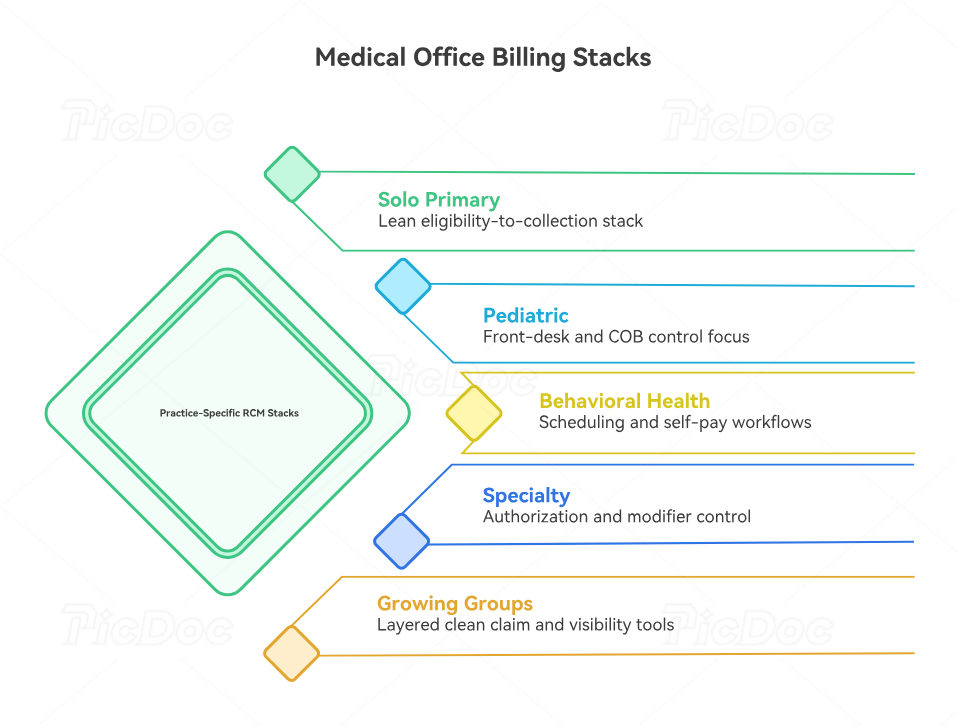
A solo primary care or family medicine office usually needs a lean stack built around eligibility, charge capture, claim scrubbing, payment posting, and patient-balance collection. That office benefits from tight alignment between encounter forms and superbills, problem list documentation, EHR coding terms, medical necessity guidance, risk adjustment workflows, HCC coding definitions, and value-based care terminology. Small primary care groups gain the most when one stack protects both visit-level collections and long-range panel economics.
A pediatric or high-volume general practice needs stronger front-desk and COB control. Coverage order, subscriber changes, seasonal spikes, and family balance confusion can bury cash flow even when coding is otherwise solid. That is where solutions tied to pediatric coding references, coordination of benefits definitions, patient responsibility terms, commercial insurance billing rules, claims management workflows, collections and bad debt handling, and payment posting controls become decisive. Pediatric practices should value speed and accuracy at intake almost as highly as coding depth.
Behavioral health and telemedicine-heavy groups need a different stack. Their strongest gains often come from scheduling integration, documentation prompts, authorization visibility, and patient self-pay workflows. Billing tools should be tested against behavioral health billing terminology, telemedicine coding definitions, documentation query terms, SOAP note standards, EMR documentation workflows, practice management system concepts, and RCM software terms. A behavioral health group usually wins more from friction reduction than from brute-force claim volume tools.
Procedural and specialty practices should build around authorization tracking, modifier accuracy, contract visibility, and denial workqueue control. Their margin gets hit by underpayments, missed medical necessity details, incomplete attachments, and complex follow-up. These practices need solutions that respect radiology billing terms, lab and pathology coding essentials, orthopedic surgery CPT references, cardiology CPT guides, gastroenterology coding details, anesthesia billing terminology, surgical compliance concepts, and modifier usage guidance. In these settings, one missed rule can erase the profit from several routine visits.
Growing multi-provider practices should think in layers. The first layer handles clean claim production. The second layer manages visibility: dashboards, denial categories, payer performance, and collector productivity. The third layer protects growth through compliance, automation, and reporting. That means deeper investment in billing automation terms, data analytics and reporting language, medical coding system updates, coding regulatory compliance, Medicare documentation requirements, Stark Law and Anti-Kickback terminology, and disciplined record retention practices. Growth exposes weak structure fast. The right stack prevents that exposure from turning into cash loss.
5. How to Roll Out a New Billing Solution Without Disrupting Collections
Implementation should start with baseline measurement. Before any go-live, the practice should record current denial rate, first-pass acceptance, days in A/R, payment posting lag, patient collection rate, top payer issues, and staff touchpoints per claim. Those benchmarks should sit inside a shared review framework built from RCM KPIs, claims reconciliation processes, EOB interpretation standards, payment posting rules, collections terminology, healthcare claims management concepts, and medical billing reconciliation language. A practice that skips the baseline cannot prove improvement and usually ends up evaluating software on vibes.
Next comes data discipline. The system should launch with clean payer tables, accurate provider identifiers, current fee schedules, mapped adjustment logic, and role-based permissions. This stage also needs attention to medical abbreviations and acronyms, health information management concepts, healthcare data security terminology, record retention standards, EHR integration terms, EMR documentation rules, and practice management system language. Messy setup creates months of fake troubleshooting because the practice mistakes bad configuration for bad software.
Training deserves its own plan. Front-desk staff need eligibility, registration, and patient-responsibility workflows. Billers need payer routing, edit resolution, remittance handling, and workqueue ownership. Providers need documentation prompts that support speed and specificity. Managers need dashboard interpretation and accountability rules. Those lessons should be tied directly to coding competency standards, coding education and training terms, coding education accreditation concepts, certification renewal and recertification terms, professional development terms, CEU expectations, and coding career development language. Strong adoption comes from role-specific clarity, not from a one-hour generic walkthrough.
Finally, the first ninety days should be run like a controlled improvement cycle. Review denials weekly. Audit payment posting variance. Pull rejected claim samples. Watch whether the tool reduces manual touches per account. Track where staff still revert to spreadsheets, side notes, or memory. Use medical coding audit terms, coding ethics and standards, medical coding certification terminology, professional credentialing organization concepts, medical coding system update awareness, automation terminology, and sharper data analytics reporting terms to keep the new process measurable. The goal is steady margin protection, faster recovery, and less operational fragility.
6. FAQs
-
For most small practices, the first investment belongs in front-end accuracy and claim cleanliness. That usually means better eligibility verification, cleaner charge capture workflows, stronger claims management controls, reliable clearinghouse processing, and faster payment posting. A practice with weak front-end accuracy keeps creating new A/R while trying to work old A/R.
-
That decision depends on complexity. A solo or low-volume practice often benefits from an all-in-one environment with strong practice management system support, solid RCM software functions, and dependable EHR integration. A specialty or growth-stage group often needs specialized layers for denials, analytics, and documentation. The right answer is the one that removes operational friction fastest.
-
The first dashboard should include first-pass acceptance, denial rate, days in A/R, payer turnaround, net collection rate, posting lag, patient collection rate, and top adjustment categories. Those measures align with revenue cycle KPI terms, claims reconciliation workflows, CARC interpretation, RARC interpretation, and accurate reimbursement review. Owners need measures that tie directly to cash and workload.
-
Look for faster categorization, clearer ownership, shorter follow-up cycles, cleaner appeal notes, and fewer repeats from the same root cause. Good denial tools work best when paired with strong EOB review, smarter claims management processes, tighter coding edit workflows, and disciplined medical coding audits. A workqueue alone does not solve denials. Root-cause correction does.
-
These practices should prioritize scheduling integration, documentation support, patient self-pay workflows, and clean handling of coverage rules. Their tools should align with behavioral health billing terms, telemedicine coding definitions, SOAP note structure, coding query processes, and EMR documentation standards. Their billing friction usually lives where scheduling, documentation, and reimbursement intersect.
-
It matters heavily because duplicate entry creates errors, delays, and staff fatigue. Strong integration improves demographic flow, note access, code transfer, and claim preparation. It also supports cleaner problem list management, stronger EHR coding terms, more reliable EMR documentation workflows, and better practice management coordination. Poor integration quietly drains staff time every day.
-
Outsourcing makes sense when backlog, turnover, specialty complexity, or payer follow-up needs exceed the internal team’s capacity. It can also help during rapid growth or implementation recovery. Even then, the practice still needs internal literacy in revenue cycle terms, medical billing reconciliation, data analytics reporting, regulatory compliance, and healthcare data security. Outsourcing works best when oversight stays sharp.
